Features · Payments
Rent payment management
Rent tracked from the day a tenant moves in to the day they move out, with nothing marked collected until you say so. One dashboard for every contract, every month.
14-day free trial · no card required
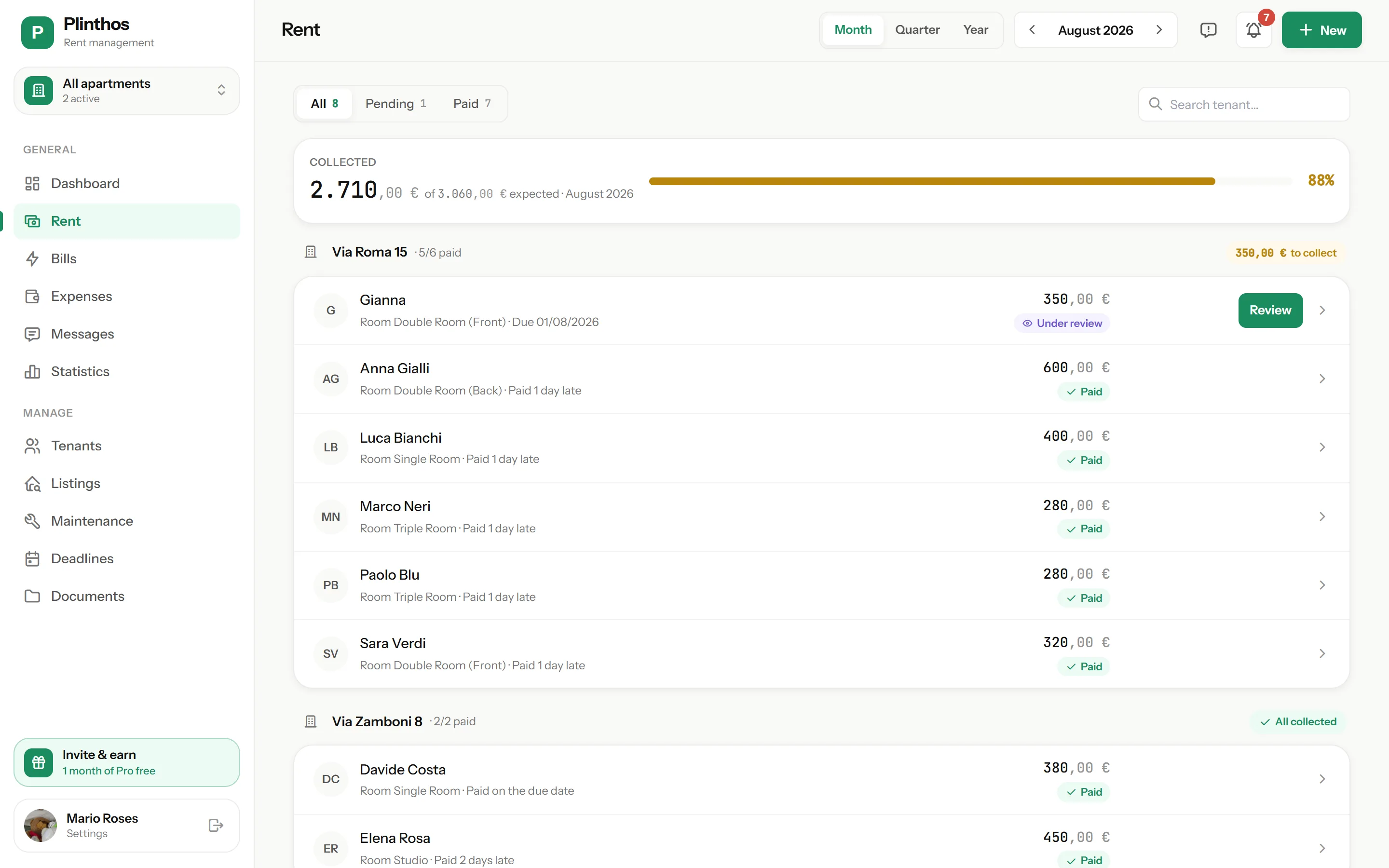
Generate, mark, confirm
The same confirmation flow applies to bill shares.
Rent generates automatically
On the 1st of each month, Plinthos creates one rent entry per active contract. Mid-month move-ins and move-outs get pro-rata amounts based on actual days occupied.
Your tenant marks it paid
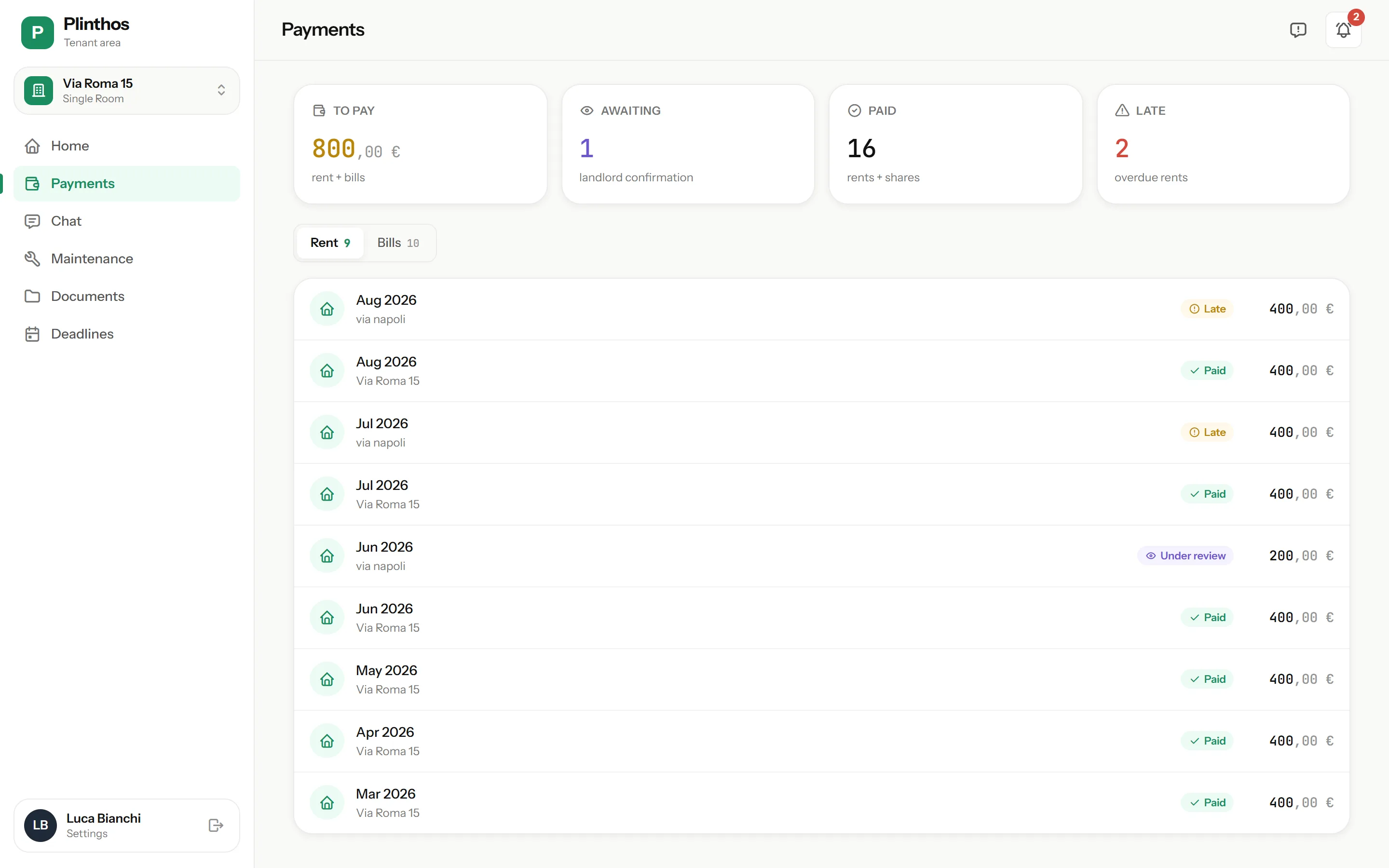
After paying by bank transfer or cash, your tenant marks the rent as paid from their free app and attaches a photo of the transfer or receipt. You get a notification right away.
You confirm
Review the proof and confirm with one tap, or reject with a reason your tenant can see. Nothing counts as collected until you confirm it.
Everything the rent cycle needs
Automatic pro-rata
Mid-month move-ins and move-outs are billed for the days actually occupied, calculated automatically for the first and last month of the contract.
Reminders on day 5 and day 10
An unpaid rent turns late automatically 5 days after the due date, and your tenant gets a reminder. A second reminder goes out on day 10, and you’re notified too.
Receipt PDFs
Once a payment is confirmed, generate a PDF receipt directly from the entry.
Per-room or per-bed pricing
Set pricing per room or per bed for shared rooms. Each contract keeps its own fixed amount — changing a room’s list price never alters existing contracts.
Full history and yearly export
Every payment is archived by month and by tenant. A yearly summary exports income per property.
Withdraw before confirmation
If a tenant marks a payment by mistake, they can withdraw it any time before you confirm it.
Payment states
Nothing counts as collected until you confirm it — here is what each state means.
| State | How it happens | Tenant sees | Your action |
|---|---|---|---|
| Pending | Generated automatically on the 1st of the month | Rent due | Wait, or send a manual reminder |
| Awaiting confirmation | Tenant marks it paid and attaches proof | “Awaiting confirmation” | Confirm with one tap, or reject with a reason |
| Paid | You confirm the tenant’s proof | Paid | Generate a receipt PDF if needed |
| Rejected | You reject the claim with a mandatory reason | Rejected, with your reason; can mark again | Wait for the tenant to mark it again |
| Late | Automatic, 5 days after the due date if still pending | First reminder sent automatically | Second reminder goes out on day 10; you can also remind manually anytime |
Web and mobile, same data
Confirm a payment from your phone and see it updated in the browser a moment later — the same data, in real time, on both.
Your tenant uses the free tenant app to mark payments and attach proof. If they don’t have it yet, reminders still reach them by WhatsApp — a phone number is enough.
Common questions
How do I know who has paid?
Can my tenant mark payments themselves?
What happens if a payment is late?
How does pro-rata work for a mid-month move-in?
Can two tenants in the same room pay different amounts?
Does the payment itself happen inside the app?
Manage rent, payments and utility bills in one place.
No credit card required.
- 14 days free, full access — the trial starts when you add your first property
- No card at signup — you only enter payment details if you subscribe
- Tenants pay nothing — your subscription covers their accounts
- Less admin each month — rent, payments and utility bills are always up to date
* billed €71.99/year
Only if you subscribe at the end of your 14-day trial.